

Plusnet Full Fibre 145 High Speed: Real-World Guide

Written by Shay Ramani
Reviewed by Tim Bailey
6 min read
Updated: 17 Sep 2026
Plusnet Full Fibre 145 High Speed: Real-World Guide

Plusnet Full Fibre 145 is a full fibre (FTTP) broadband package with a 145Mb average estimated download speed and unlimited usage, aimed at homes that stream in 4K, game online and work from home at the same time. It runs over the Openreach fibre-to-the-premises network, which brings a fibre cable directly into the property rather than relying on old copper phone lines.

For a heavy user, the number that matters is not just the headline 145Mb. What decides whether the connection feels fast is how the speed holds up across several devices at once, how quick the upload is for video calls and cloud backups, and how stable the latency stays during gaming. This guide answers those real-world questions and sets the package against faster tiers so you can decide whether 145Mb is the right ceiling for your household.

Free Price Compare checks live broadband availability and pricing by postcode across UK providers, and we source connection and coverage data from Ofcom publications.

Quick Answer: Plusnet Full Fibre 145 High Speed

  • Plusnet Full Fibre 145 delivers a 145Mb average estimated download speed with unlimited usage over the Openreach FTTP network.
  • Full fibre reached 82% of UK homes (24.9 million premises) as of January 2026, per Ofcom’s Connected Nations update (Spring 2026) – so run a postcode check first.
  • 145Mb comfortably supports several 4K streams, video calls and online gaming at once; a single 4K stream needs only around 25Mbps.
  • Latency (ping) matters more than raw speed for gaming, and full fibre typically gives lower, steadier ping than older part-copper connections.
  • Plusnet lists Full Fibre 145 at £35.99 in its residential price guide (last updated 26 August 2026), with a £50 Plusnet Reward Card offer on a 24-month contract advertised until 8 October 2026.

Last updated: September 2026

Written by the Free Price Compare editorial team | Reviewed September 2026

What you get with Plusnet Full Fibre 145

Plusnet Full Fibre 145 provides a 145Mb average estimated download speed, unlimited monthly usage and a full fibre connection delivered over the Openreach FTTP network, according to Plusnet’s own Full Fibre pages. Full fibre means the fibre cable runs all the way to your property, so there is no slower copper section in the line, which is the arrangement that limits speed on older part-fibre products. The “average estimated” wording follows the Ofcom Broadband Speeds Code of Practice, under which providers must quote a realistic average measured at peak times (8pm to 10pm) rather than a best-case maximum. For a heavy household, the practical takeaway is that 145Mb is a speed you should see, not a marketing ceiling you rarely reach.

The package is sold on a 24-month contract for most new customers. Plusnet also runs promotional incentives from time to time, and its current site advertises a reward card for new Full Fibre 145 orders on a 24-month term, shown as ending 8 October 2026.

James Ford Broadband Deals Reviewed by James Ford, TV and Broadband Expert

Full Fibre 145

  • New customers only
145Mb average* speed
Unlimited Downloads
£9.99 Setup costs
24 Month contract
Pay as you goCalls
£22.99per month

Full Fibre 300

  • New customers only
300Mb average* speed
Unlimited Downloads
£9.99 Setup costs
24 Month contract
Pay as you goCalls
£23.99per month

Fibre

  • New customers only
66Mb average* speed
Unlimited Downloads
£9.99 Setup costs
24 Month contract
Pay as you goCalls
£22.99per month

Is 145Mb fast enough for gaming, streaming and working from home?

145Mb is fast enough to run several 4K streams, multiple video calls and online gaming at the same time in a typical home, because each activity uses far less bandwidth than the headline figure suggests. A single 4K Netflix or Disney+ stream needs around 25Mbps, a Full HD stream around 5Mbps to 8Mbps, a Zoom or Teams call under 4Mbps, and most online games use only 1Mbps to 3Mbps while playing. Add three 4K streams, two video calls and a games console and you are still using well under half of 145Mb. The likely bottleneck in a busy home is not the line speed but the Wi-Fi, especially older 2.4GHz connections, which often struggle to exceed 70Mbps regardless of how fast the incoming connection is.

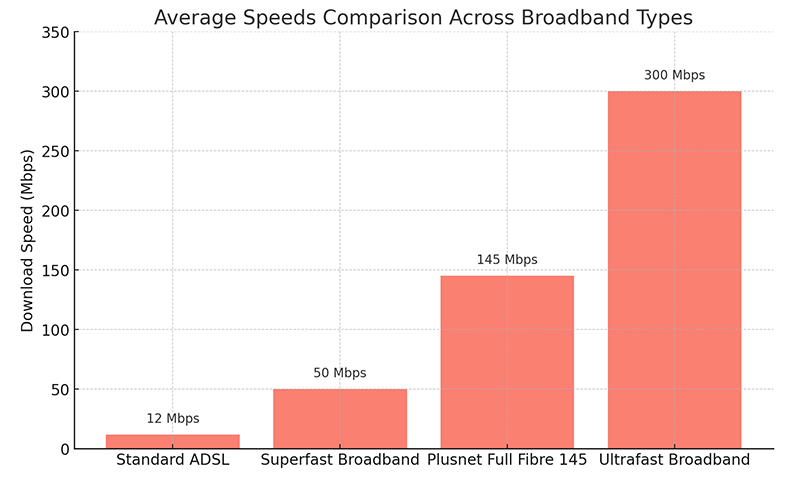
If you want a rough hierarchy: a lighter household can manage on the entry-tier full fibre products, while 145Mb suits homes with multiple heavy users. If you regularly move very large files, host game servers or have five or more people online simultaneously, you may prefer a faster tier such as Plusnet Full Fibre 500.

Check full fibre availability at your postcode

What is the upload speed on Full Fibre 145, and why does it matter?

Upload speed on full fibre is far higher and steadier than on older copper-based connections, which matters enormously for anyone working from home, video calling or backing up to the cloud. On older FTTC (part-copper) lines, uploads are typically a small fraction of the download, often single digits in Mbps, which is what causes stuttering on video calls when several people are online. Full fibre products such as Full Fibre 145 provide a materially better upload than an equivalent-speed FTTC service, so screen sharing, sending large work files and uploading video are noticeably smoother. Plusnet’s official pages headline the download figure rather than publishing a fixed upload for this tier, so treat any precise upload number you see on third-party sites with caution and confirm it during ordering.

For a remote worker, the difference between a copper-era upload and a full fibre upload is the difference between a call that freezes when a family member starts uploading photos and one that holds steady. This is one of the strongest reasons a heavy user should choose full fibre over a cheaper part-fibre deal even at the same download speed.

Is full fibre good for gaming latency and lag?

Full fibre generally gives lower and more consistent latency (ping) than older part-copper broadband, which is what reduces lag in fast online games. Latency is the round-trip time for data to reach the game server and return, measured in milliseconds, and for competitive gaming it matters more than raw download speed. Because full fibre carries no slower copper section and less line interference, ping tends to be lower and more stable, with fewer spikes during busy evening hours. Raw speed beyond about 100Mb makes little difference to in-game lag; a stable connection with low jitter is what you actually feel.

To protect gaming performance on Full Fibre 145, use a wired Ethernet connection to the console or PC where possible, keep the router firmware updated, and avoid heavy simultaneous uploads mid-match. If you play competitively and want extra headroom for large game downloads and updates, a faster tier reduces the time you spend waiting rather than improving in-game responsiveness. Our guide to whether 900Mb broadband is worth it covers when a gigabit tier pays off.

Is full fibre good for gaming latency and lag

Not sure which speed tier you need?

Compare full fibre packages side by side and check what’s live at your address.

Is Full Fibre 145 worth it, or should you go faster or slower?

Full Fibre 145 is worth it for most heavy households, but the right choice depends on how many people use the connection at once and how large your regular downloads are. For a home with two or three people streaming, calling and gaming simultaneously, 145Mb provides comfortable headroom without paying for gigabit speeds you would rarely saturate. If your household is lighter, a cheaper entry-tier full fibre product such as Plusnet Full Fibre 74 may be enough. If you have five or more heavy users, frequently download very large game or video files, or want the fastest cloud backups, a 300Mb or higher tier makes sense.

Independent full-fibre providers offered 900Mbit-1Gbit deals from around £26 a month, versus about £39 a month for the cheapest comparable deal from a larger provider, according to Ofcom’s Pricing Trends for Communications Services in the UK report (pricing data October 2024). That gap is a useful reminder to compare the whole market before committing, because a faster tier is not always more expensive than a mid-tier one on promotion. It is worth checking what a step up costs at your address rather than assuming 145Mb is the value choice.

How much does Plusnet Full Fibre 145 cost in 2026?

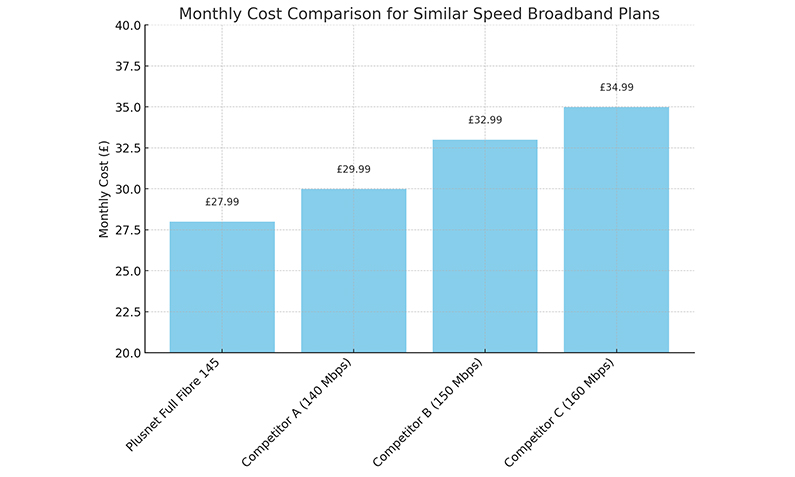
Plusnet lists Full Fibre 145 in its residential price guide, with different figures shown for different sign-up and re-contract date bands. The price you pay depends heavily on whether you are a new customer on a promotional deal or an existing customer at standard pricing, which is why the figures vary so widely. New customers ordering Full Fibre 145 on a 24-month contract are currently offered a £50 Plusnet Reward Card, an incentive Plusnet shows as ending 8 October 2026. Some third-party deal listings advertise lower monthly prices, but these are promotional listings rather than Plusnet’s own standing price guide, so always confirm the total contract cost and any mid-contract rises before you order.

Detail Full Fibre 145
Average download speed 145Mb (estimated, peak-time)
Usage Unlimited
Network Openreach FTTP (full fibre)
Contract 24 months (typical new-customer term)
Price guide listing £35.99 (also £49.20 / £49.32 for other date bands)
Current incentive £50 Plusnet Reward Card, ending 8 October 2026

Figures are indicative and may change. Broadband contracts commonly include an annual mid-contract price rise, so check the provider’s current terms for how and when your monthly price could increase before the contract ends.

See live Plusnet and full fibre prices

Do you need to check availability before ordering?

Yes, you must run a postcode availability check before ordering Full Fibre 145, because full fibre is not yet available everywhere. Full fibre reached 82% of UK homes, or 24.9 million premises, and gigabit-capable broadband reached 89% of UK residential premises, according to Ofcom’s Connected Nations update (Spring 2026, data as of January 2026). That leaves a meaningful minority of homes without an FTTP connection, and availability can differ street by street within the same town. A postcode check confirms whether the Openreach full fibre network has reached your property and which speed tiers you can actually order there.

If full fibre is not yet live at your address, you may only be offered part-fibre (FTTC) products, where the download and especially the upload will be lower. Checking first avoids ordering a speed your line cannot deliver and lets you compare every tier available to you, from entry-level up to gigabit, in one place. You can also see how neighbouring options such as Vodafone Full Fibre 150 or Sky Full Fibre 150 compare at a similar speed.

How to get the most from Full Fibre 145 across the whole home

Getting full 145Mb across a whole home depends on your Wi-Fi setup, not just the incoming line, because Wi-Fi is where most speed is lost. The connection into your router will carry the full 145Mb, but weak or congested Wi-Fi can cut what your devices actually receive, particularly on the older 2.4GHz band which is generally limited to under 70Mbps. A few practical steps make a large difference to real-world performance for heavy users.

  • Connect gaming PCs, consoles and desktops by wired Ethernet where you can, for the fastest and steadiest speeds.
  • Use the 5GHz Wi-Fi band for phones, laptops and tablets in the same room as the router, and keep 2.4GHz for distant, low-demand devices.
  • Position the router centrally and off the floor, away from thick walls, mirrors and other electronics.
  • Add a mesh Wi-Fi system or wired access point for larger homes so speed holds up in every room.
  • Restart the router occasionally and keep its firmware updated to maintain stable latency.

If your home is large or has several floors and heavy simultaneous use, whole-home coverage often matters more than raw speed, so budget for a mesh setup alongside the package. For a busy shared household or student house, our best broadband setup guide covers splitting usage and keeping speeds stable with many devices online.

How to get the most from Full Fibre 145 across the whole home

Compare full fibre deals for heavy users

FAQs about Plusnet Full Fibre 145

Is Full Fibre 145 the same as fibre 65 or fibre 150 from other providers?

Full Fibre 145 is a true full fibre (FTTP) product with the fibre running all the way to your property, whereas fibre 65 is usually part-copper (FTTC) with fibre only to the street cabinet. Products branded around 145Mb or 150Mb from different providers are often similar full fibre tiers with slightly different average speed labels. Always check whether a deal is genuine full fibre or part-fibre, as the upload speed and reliability differ significantly.

Does Full Fibre 145 come with a router?

Full fibre broadband packages normally include a router supplied by the provider, set up to work with the connection. Plusnet's official pages did not confirm a specific router model for this tier in the sources available, so check exactly which router is included when you order. If you want the best whole-home coverage, ask whether a mesh Wi-Fi option is available.

What upload speed does Full Fibre 145 give?

Full fibre products give a much higher and more stable upload than part-copper connections, which helps video calls, cloud backups and file sharing. Plusnet headlines the 145Mb download figure rather than publishing a fixed upload for this tier, so confirm the exact upload during ordering. As a rule, expect a full fibre upload to comfortably support several simultaneous video calls without freezing.

Is full fibre worth it for gaming?

Full fibre is worth it for gaming mainly because it delivers lower and steadier latency, not just faster downloads. Once your connection is above roughly 100Mb, extra speed makes little difference to in-game lag, but stable low ping reduces stuttering during matches. Using a wired Ethernet connection on your console or PC gives the best and most consistent gaming performance.

How many devices can Full Fibre 145 handle at once?

145Mb comfortably handles multiple heavy devices at once, because each activity uses far less than the headline speed. You could run three 4K streams, two video calls and online gaming and still use under half the available bandwidth. The more common limit in busy homes is Wi-Fi coverage, so consider a mesh system if speeds drop in distant rooms.

Can I get Full Fibre 145 at my address?

You can only order Full Fibre 145 if the Openreach full fibre network has reached your property, so run a postcode check before signing up. Full fibre reached 82% of UK homes as of January 2026 according to Ofcom, but availability varies street by street. If full fibre is not yet live at your address, you may only be offered slower part-fibre products.

Is there a mid-contract price rise on Full Fibre 145?

Broadband contracts commonly include an annual mid-contract price rise, so your monthly cost can increase during a 24-month term. Ofcom now requires providers to state any in-contract price rise in pounds and pence at the point of sale rather than as a vague percentage. Check the provider's current terms so you know exactly how and when your price could change before committing.

Should I choose a faster tier than 145Mb?

Choose a faster tier if you have five or more heavy users, frequently download very large game or video files, or want the fastest cloud backups. For most homes with two or three simultaneous heavy users, 145Mb provides comfortable headroom without paying for gigabit speeds you would rarely fully use. Compare what a step up to 300Mb or higher costs at your address, as it is not always much more on promotion.

What is a good broadband speed for working from home?

A good working-from-home speed prioritises upload as well as download, because video calls, screen sharing and cloud syncing all rely on strong upload. Any full fibre tier, including 145Mb, gives a far better upload than an equivalent-speed part-copper line, which is the main cause of frozen calls. For a single remote worker, even entry-tier full fibre is usually enough; for a household with several remote workers, 145Mb adds useful headroom.

Why am I not getting the full 145Mb on a speed test?

Most speed shortfalls on a fast full fibre line are caused by Wi-Fi rather than the connection itself, especially the older 2.4GHz band which often stays under 70Mbps. To test the true line speed, connect a device by wired Ethernet directly to the router and run the test again. If wired speeds are also well below 145Mb, contact your provider, as the Ofcom Broadband Speeds Code of Practice gives you rights if speeds fall short of the guaranteed minimum.

How long does it take to switch to Plusnet Full Fibre 145?

Switching to full fibre usually takes a couple of weeks and may require an engineer visit if a full fibre connection has not previously been installed at your property. If you are moving from another provider on the same Openreach network, the One Touch Switch process can coordinate the change for you. Over 2 million customers used One Touch Switch between its September 2024 launch and the end of 2025, according to Ofcom.

Can I negotiate a better price at the end of my Plusnet contract?

You can often reduce your price at the end of a broadband contract by comparing the whole market and contacting your provider before your term ends. Existing-customer standard prices are frequently higher than new-customer promotional deals, so it pays to check what you could get elsewhere first. If you are within your rights to leave without penalty, use that as leverage or switch to a better-value package.

Also Read Related Articles


Information correct as of 14 September 2026. Prices, tariffs, policy details and providers change frequently, so please check the latest details before making a decision. This article is for general information only and does not constitute financial advice. Free Price Compare is authorised and regulated by the Financial Conduct Authority (FCA).

4000+ reviews