

Use the Router: ISP Hub or Your Own?

Written by Shay Ramani
Reviewed by Prajesh Manvar
7 min read
Updated: 3 Aug 2026
Use the Router: ISP Hub or Your Own?

You can use the router your broadband provider sends you, and for most UK households that is the simplest choice, but you are usually free to use your own router instead if you prefer more control. Almost every UK broadband package includes a free Wi-Fi router in the price, sent to you before your service goes live, and the provider expects you to return it when the contract ends.

The two questions people ask are the same ones this guide answers: is the free hub good enough, and can you swap it for a better third-party router? The answer depends on your provider, your connection type (FTTP, FTTC or cable), and whether your plan bundles a phone service like Digital Voice. Free Price Compare draws on Ofcom coverage data and published provider policies to keep this guidance accurate for 2026.

Quick Answer

  • Most UK providers let you use your own router, but Vodafone Pro Broadband and any plan with Digital Voice require you to keep the supplied hub in the chain.
  • A free ISP router cannot be used with a different provider’s broadband, and it stays the provider’s property, so you must return it at the end of the contract.
  • On Openreach full fibre you can bypass the hub entirely by plugging a PPPoE router straight into the Openreach ONT box.
  • Only some hubs offer a true modem mode: Virgin Media’s Hub 5 does, while BT, EE and Sky hubs do not.
  • Full fibre is available to 82% of UK homes (24.9 million premises), per Ofcom’s Connected Nations update (Spring 2026, data as of January 2026).

Last updated: July 2026

Written by the Free Price Compare editorial team | Reviewed July 2026

Is the free ISP router good enough for most homes?

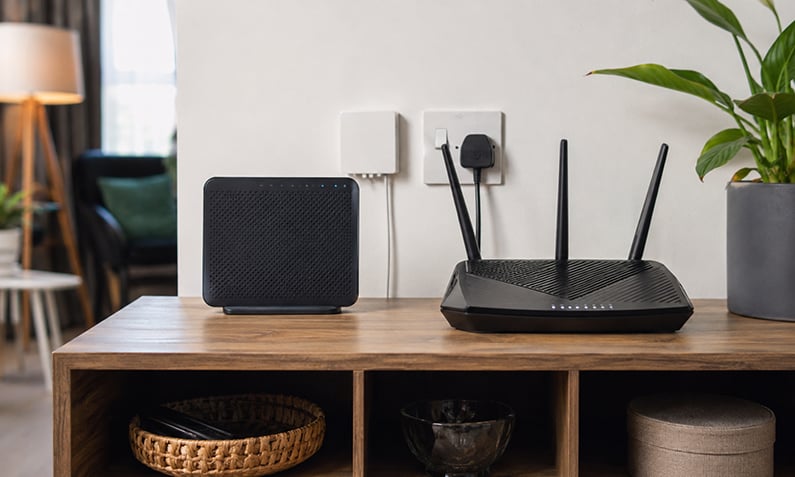
The free router your broadband provider supplies is good enough for most UK homes, and for typical households it is the sensible default. Providers now ship modern hardware as standard: Virgin Media supplies a Wi-Fi 6 Hub 5 across its plans, and BT, EE and Vodafone equip some of their faster tiers with Wi-Fi 6 or Wi-Fi 7 hubs. These devices are pre-configured, so you plug in, wait for the lights to settle, and connect. The provider also supports the hub if something goes wrong, which matters when a fault could sit anywhere between your home and the exchange.

A free hub covers the needs of a flat or an average two- or three-bed home comfortably. You would only look beyond it if you have a large or awkwardly shaped property, want features like custom DNS, port forwarding or VLAN control, or need seamless mesh coverage. If your problem is dead spots rather than raw speed, a Wi-Fi extender or mesh setup often fixes it more cheaply than a whole new router.

James Ford Broadband Deals Reviewed by James Ford, TV and Broadband Expert
Superior

  • New customers only
900Mb average* speed
Unlimited Downloads
£0.00 Setup costs
24 Month contract
Pay as you goCalls
£29.99per month

Full Fibre 150

  • New customers only
  • Switch to Fibrus and they'll cover up to £400 of your switching fees
  • No mid-contract price rises
159Mb average* speed
Unlimited Downloads
£0.00 Setup costs
18 Month contract
Pay as you goCalls
£34.99per month

Extra

  • New customers only
500Mb average* speed
Unlimited Downloads
£0.00 Setup costs
24 Month contract
Pay as you goCalls
£27.99per month

Can you use your own router with UK broadband?

You can use your own router with most UK broadband services, but you must check your provider’s contract terms first, because policies differ by company and by plan. The general rule across the industry is that providers often permit a third-party router but do not recommend it, and some warn that swapping the hub can make fault diagnosis harder. You usually cannot use a free router issued by one provider on another provider’s broadband, because it is configured for that network.

Whether a swap is worth it depends on what you want. If you value port forwarding, custom DNS, detailed logging or a specific mesh ecosystem, a third-party router gives you that control. If you just want reliable Wi-Fi, the free hub is usually enough. Before buying anything, it helps to understand the difference between speed problems and coverage problems, which our guide on improving broadband speed at home sets out.

Ofcom’s One Touch Switch system also makes moving providers easier if your current router or plan does not suit you: over 2 million customers used it to change broadband or landline provider between its September 2024 launch and the end of 2025, according to Ofcom.

Compare full fibre broadband deals

Which providers let you use your own router in 2026?

Provider policies on third-party routers vary, so the safest move is to confirm before you buy. Openreach-based providers such as BT, EE and Plusnet generally allow a third-party router, and some BT hubs may work on other Openreach-based services because they share the same network. Vodafone is more restrictive: some non-Vodafone routers must be Openreach-approved, and some Vodafone plans with Digital Voice may require the supplied device. Virgin Media, on cable, may require you to switch the Virgin Media Hub into modem mode before connecting your own router. Ofcom says communications providers should give clear information about equipment requirements and setup for digital voice services, while Virgin Media’s own help states modem mode lets you use your own router and that you enable it in the Hub settings.

Provider Own router allowed? Key condition
BT Yes PPPoE router on FTTP/FTTC; hub stays if you have Digital Voice
EE Yes Router must support Ethernet WAN; request login details
Plusnet Yes Has a dedicated third-party router setup help page
Vodafone Limited Not on Pro Broadband or Digital Voice plans; router must be Openreach-approved
Virgin Media Yes Set the Hub to modem mode first
Sky Restricted Sky hubs cannot run as a modem; limited support for own router

Figures are indicative and may change; check your provider’s current policy before switching hardware.

Which providers let you use your own router in 2026

How do you put your router into modem mode?

To put your router into modem mode, you log into the hub’s settings page in a web browser and switch it from router mode to modem-only (sometimes called bridge mode), which turns off the hub’s Wi-Fi and routing so your own router can take over. Modem mode is only available on some hubs: Some Virgin Media hubs support it, while support on BT, EE and Sky hubs is more limited. On Virgin’s cable network, modem mode is the standard way to run your own router, because the Hub handles the DOCSIS connection your third-party router cannot.

On Openreach full fibre the situation is different and often simpler. The BT Smart Hub has no official modem mode, but on FTTP you can bypass the hub entirely by plugging a PPPoE router straight into the Openreach ONT (the small box on your wall). That removes the ISP hub from the chain completely, subject to the phone-service exception below. If you are unsure which connection type you have, checking coverage first tells you whether full fibre or gigabit-capable broadband is available at your address, according to Ofcom coverage data.

Check what speeds your postcode can get

Compare full fibre and gigabit deals available at your address before you change any hardware.

What connection settings do you need (PPPoE, VLAN, DNS)?

The main connection settings you need are PPPoE authentication details, and on some networks a VLAN tag: most Openreach FTTP and FTTC services use PPPoE authentication, so a third-party router needs your PPPoE username and password to connect. On Openreach lines these are often generic rather than account-specific, but you should confirm with your provider. Some full-fibre providers built on the CityFibre network require an extra VLAN tag on the WAN connection, which you set in your router’s internet settings. Without the correct authentication and VLAN details, your own router will not establish a connection even if the physical cabling is correct. UK routers typically need the ISP’s **broadband login details** and, for some services, a **VLAN ID** entered in the router’s WAN/Internet settings; for example, EE says full fibre uses **CHAP** authentication and part fibre uses **VLAN 101**, and Linksys says you must enter the VLAN information supplied by your ISP if it is not preconfigured[2][4]

DNS is separate and optional. Your router uses the provider’s DNS servers by default, but a third-party router lets you set custom DNS if you want faster lookups or content filtering. Two things to remember when going your own way: there is no line-speed increase from a better router, since your speed is capped by your broadband plan, and you may lose ISP-tied extras. Provider phone services such as BT Digital Voice and EE Digital Home Phone often force the hub to stay in the chain, so a full bypass is not always possible.

Is there a way to compare broadband router range before you buy?

There is no official broadband router range comparison, because signal strength depends heavily on your home’s layout, walls and interference, so a router that covers one house well may struggle in another. Ofcom and providers publish speed figures, not real-world coverage maps for individual hubs, and advertised Wi-Fi throughput is measured in ideal conditions. The most reliable guide is the Wi-Fi standard: a Wi-Fi 6 or Wi-Fi 7 router handles more devices and holds speed better across a busy home than an older Wi-Fi 5 hub, but neither guarantees whole-home coverage on its own. Ofcom says Wi‑Fi performance depends on the router, the number of connected devices, and the layout of your home, and no single hub or router can guarantee whole-home coverage on its own.

For range problems, a mesh system usually beats a single powerful router, because it places multiple nodes around the home rather than relying on one device to reach every corner. Popular UK aftermarket options include mesh kits from the TP-Link Deco range and standalone Wi-Fi 6 routers, though eero and similar closed systems trade some diagnostic control for simplicity. If your speeds drop off in certain rooms, our guide to UK broadband blackspots and slow areas helps you work out whether the fault is your hardware or your connection.

See broadband packages for your home

What are the risks of using a third-party router?

The main risk of using a third-party router is reduced support: several UK providers will not fully troubleshoot a connection running through non-supplied hardware, and the smaller providers rarely offer setup guides at all. You also lose ISP-tied features such as parental controls tied to the hub, guest Wi-Fi profiles configured by the provider, and in some cases the phone service, since Digital Voice handsets plug into the supplied hub. A third-party router will not increase your line speed either, because your speed is set by your broadband plan and the underlying network.

There are practical upsides that make the trade worthwhile for some people. A quality router gives you port forwarding, custom DNS, detailed traffic logging and, on mesh systems, better whole-home coverage. If you decide to keep your old ISP hubs after upgrading, you can reuse a spare as a wired access point or Wi-Fi extender in another room, rather than leaving them in a drawer. Just remember the free hub remains the provider’s property and must go back at the end of the contract, or you may be charged for it.

What are the risks of using a third-party router

Find a faster full fibre deal

FAQs about use the router

What is a router and how is it different from a modem?

A router shares one internet connection across multiple devices over Wi-Fi and Ethernet, managing traffic between them and the network. A modem converts the signal coming down your line into data your devices can use. Most UK broadband hubs combine both functions in a single box, which is why UK providers supply an all-in-one router rather than a separate modem.

Can I use my own router with BT, Sky, EE or Virgin Media?

You can use your own router with BT and EE on Openreach lines using PPPoE, and with Virgin Media once you set the Hub to modem mode. Sky is more restricted, as its hubs cannot run as a modem and support for third-party routers is limited. Always check your specific plan, since phone services like Digital Voice may require the supplied hub to stay connected.

Do all broadband deals come with a free router?

Almost all UK broadband packages include a free router in the price, sent to you before your service goes live. The router remains the provider’s property and usually needs to be returned at the end of your contract, or you may be charged for it. Only a few specialist or business plans expect you to supply your own hardware.

Will using a third-party router affect my ISP support?

Yes, using a third-party router can limit the support your provider offers, because many will not fully troubleshoot a connection running through hardware they did not supply. Some ask you to reconnect the original hub to prove a fault is on their side. Larger providers with dedicated setup pages are more accommodating than smaller ones.

Can I use a free router from one provider with another provider’s broadband?

No, a free router supplied by one provider will not work on another provider’s broadband, because it is configured and locked to that specific network. If you switch providers, you keep using the new provider’s hub or buy an get access toed third-party router. Return the old hub to avoid a non-return charge.

How do I connect my own router directly to the Openreach ONT?

On full fibre, plug an Ethernet cable from the WAN port of your own PPPoE router into the LAN port of the Openreach ONT box on your wall, then enter your PPPoE login details. This bypasses the ISP hub entirely. It only works if your plan does not depend on the supplied hub for a phone service such as Digital Voice.

What can I do with old ISP routers I no longer use?

Spare ISP routers you own can be reused as a wired access point or Wi-Fi extender in a room with weak signal, giving another network a boost. Routers you were required to return should go back to the provider to avoid a charge. Working hardware can also be recycled responsibly at an electrical recycling point.

Does a better router make my broadband faster?

A better router does not increase your line speed, because your download speed is set by your broadband plan and the network, not the router. A newer router with Wi-Fi 6 or Wi-Fi 7 can improve how well that speed reaches your devices, especially in a busy home with many connections. To get faster broadband you need a faster plan, not just new hardware.

Do I need a 4G router to get Wi-Fi into a flat quickly?

A 4G or 5G mobile broadband router can be a quick way to get Wi-Fi into a flat without waiting for a fixed line to be installed, using a SIM and mobile signal. It suits short-term or backup use, but a fixed fibre connection is usually cheaper per gigabyte and more reliable for a permanent home. Check mobile coverage at the address before relying on one.

Can I take my broadband router to a different address?

You can take your broadband router to a new address only if the connection there is on the same network and you notify your provider, as your account and settings are tied to your line. It will not simply work at a friend’s house on a different provider. When you move home, your provider arranges the transfer and confirms whether your existing hub is compatible.

What VLAN or PPPoE settings do I need for a third-party router?

Most Openreach FTTP and FTTC connections need your PPPoE username and password entered into the router’s internet settings. Some CityFibre-based full-fibre providers also require a VLAN tag of 911 on the WAN connection. Your provider can confirm the exact credentials and whether any VLAN tagging applies before you set up your own router.

Is a mesh system better than a single router for coverage?

A mesh system is usually better than a single router for whole-home coverage, because it uses several nodes placed around the property rather than one device trying to reach every corner. A single high-power router can be enough for a flat or small home. For larger or thick-walled properties, mesh reduces dead spots more effectively than upgrading to one stronger router.

Also Read Related Articles


Information correct as of 24 July 2026. Prices, tariffs, policy details and providers change frequently, so please check the latest details before making a decision. This article is for general information only and does not constitute financial advice. Free Price Compare is authorised and regulated by the Financial Conduct Authority (FCA).

4000+ reviews