




EDF Energy Login: Complete Guide to MyAccount

Written by Andrea Troy
Reviewed by Pratik Aghera
5 min read
Updated: 31 Aug 2026
EDF Energy Login: Complete Guide to MyAccount

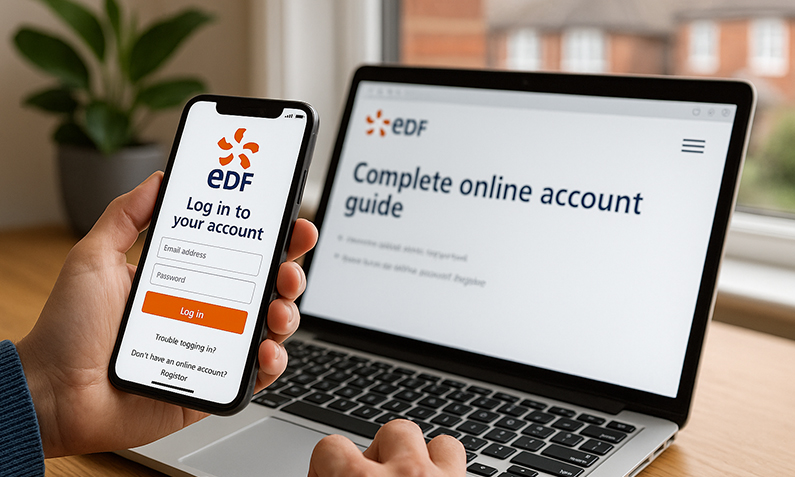
The EDF Energy login gives you access to MyAccount, the online portal and app where you can view bills, submit meter readings, make payments, change your tariff and update your details. To sign in you use the email address and password you set at registration, and the same credentials work on both the website and the EDF app.

If you are on EDF’s Standard (Variable) tariff, logging in is also the first step to checking whether you could pay less. From 1 July to 30 September 2026, the price cap for a typical dual-fuel household paying by Direct Debit is £1,663 a year, according to Ofgem. Free Price Compare draws on Ofgem publications and whole-of-market data to help households check whether a fixed deal beats the capped variable rate.

Quick Answer: EDF Energy Login

  • Your EDF account number appears on any recent EDF bill and inside MyAccount once you are signed in; you need it to register but not to log in day to day.
  • To reset your password, tap ‘Forgot password?’ on the login screen and enter your sign-up email; a reset link normally arrives within a minute or two (check Spam and Promotions if not).
  • Logging in from a new device can trigger a one-time password (OTP) sent to your email, valid for around 10 minutes as a security step.
  • The EDF app is free on Apple and Android, mirrors MyAccount, and supports fingerprint or face login on compatible phones.
  • EDF’s Standard (Variable) tariff tracks the Ofgem price cap of £1,663/year for a typical dual-fuel Direct Debit home (1 July to 30 September 2026); a fixed deal may cost less.

Last updated: August 2026

Written by the Free Price Compare editorial team | Reviewed August 2026

How do I log in to my EDF Energy account?

To log in to EDF Energy, enter the email address and password you chose when you registered for MyAccount. Go to the EDF login page or open the EDF app, enter your email, type your password and select sign in. The same details work across the website and the app, so there is no separate app login to remember. On a compatible smartphone you can switch on biometric login (fingerprint or facial recognition) after your first sign-in for faster access. If you are opening MyAccount on a device EDF does not recognise, you may be asked for a one-time password sent to your email as a security check.

MyAccount is the hub for managing your gas and electricity online. Once inside, you can view and download bills, submit meter readings, make or amend a payment, track your usage and switch tariff without calling anyone. Prepayment and pay-as-you-go customers can use MyAccount and the app too, including entering a UTRN top-up code.

Compare energy tariffs before you renew

Where do I find my EDF account number?

Your EDF account number is printed on any recent EDF bill or statement, usually near the top, and it also appears inside MyAccount once you are signed in. The account number is what EDF uses to identify your supply, and you need it to register for MyAccount for the first time. You do not need it for everyday logins once your account is set up, because you sign in with your email and password instead.

If you have gone paperless and cannot find a bill, sign in to MyAccount or the app and look under your account or profile details, where the number is displayed. If your account number recently changed, for example after a meter exchange or a supply transfer, use the most recent number shown in MyAccount, as older bills may quote a superseded reference. Use the most recent number shown in MyAccount after a meter exchange or supply transfer, because older bills may show a superseded reference, according to the supplier/account guidance.

How do I register for EDF MyAccount?

To register for EDF MyAccount, you need three things: a recent EDF bill showing your account number, an email address you control, and the postcode where your meter is (your supply postcode). Choose Register on the login screen, enter your email, create a password, then add your account number and supply postcode. EDF sends a verification link to your email, and clicking it activates the account.

Use an email address you check regularly, because it is where password resets, verification links and any one-time passwords are sent. Once registered, the same credentials sign you in to the EDF app, so download the app if you want to manage your energy on the go and enable biometric login. EDF says you can use the same login details for MyAccount and the EDF app, and the app supports biometric login such as fingerprint or Face ID, according to EDF’s help pages and Google Play listing.[8][10][1]

  • A recent EDF bill or statement showing your account number.
  • An email address you can access for the verification link.
  • Your supply postcode (where the meter is installed).
  • A password you have not used elsewhere, for security.

Paying more than you need to?

Check whether a fixed deal beats EDF’s capped variable rate.

How do I reset my password if I’ve forgotten it?

To reset your EDF password, select “Forgot password?” on the login screen of MyAccount or the app and enter your sign-up email. EDF emails a reset link, which normally arrives within a minute or two; if it does not appear, check your Spam and Promotions folders before trying again. If the link still does not come through, contact EDF support on 0333 200 5100.

A failed login is most often caused by an incorrect password rather than an account problem, so resetting the password fixes the majority of sign-in issues. Choose a fresh password you do not use on other sites, and consider turning on two-factor authentication or biometric login in the app to add a layer of protection. The National Cyber Security Centre advises using a strong, separate password for email and unique passwords for important accounts, and it recommends enabling multi-factor authentication where possible; it also says biometric solutions can be considered as an alternative to passwords.[14][20]

How do I reset my password if I’ve forgotten it

What if I’ve forgotten which email I used?

If you cannot remember which email address your EDF account is registered to, call EDF on 0333 200 5100 with your account number and supply postcode to hand so they can verify your identity and confirm the address. EDF cannot send a password reset unless you enter the correct sign-up email, so recovering the email is the necessary first step. Try any addresses you commonly use in the “Forgot password?” box first: if a reset email arrives, that confirms the address on file.

Why can’t I log in to EDF MyAccount?

Login problems with EDF MyAccount are usually down to an incorrect password, an unverified email, or a browser issue rather than a fault with your account. Start by resetting your password using the “Forgot password?” link, since a wrong password is the most common cause. If you have just registered, make sure you have clicked the verification link EDF emailed you, because the account stays inactive until you do.

If the login page will not load or the email field does not accept input, clear your browser cache, try a different browser, or switch to the EDF app. Signing in from a new device or after clearing cookies can prompt a one-time password sent to your email, valid for around 10 minutes, so enter that promptly. Persistent problems that survive a password reset are worth raising with EDF on 0333 200 5100.

How do I submit meter readings through EDF?

To submit meter readings, sign in to EDF MyAccount or the app, select the meter reading option and enter the figures shown on your meter. Accurate readings keep your bills based on real usage rather than estimates, which is especially important if you are on a Standard (Variable) tariff and want to avoid a catch-up bill later. Smart meter customers usually do not need to submit readings manually, because EDF receives them automatically, though you can still check the figures in the app.

If you have a two-rate electricity meter, such as Economy 7, enter the readings in the correct order: the low or off-peak reading first, then the normal or peak reading. Getting the order right prevents your day and night usage being swapped, which can distort your bill. Regular readings also help if you compare tariffs, because an accurate annual usage figure gives a truer picture of what a fixed deal would cost you. Ofgem says regular meter readings help avoid distorted bills and give a truer picture of what a fixed deal would cost, but the supplied primary sources do not contain a current UK numeric figure for that point.

Understanding what uses the most energy in your home alongside your readings can help you spot where costs are building up.

See how much you could save on gas and electricity

What can you do with the EDF app?

The EDF app is a free download on Apple and Android that mirrors the MyAccount website, letting you view bills, submit meter readings, make payments, check usage and manage your tariff from your phone. It works for Direct Debit, billing and prepayment customers, and pay-as-you-go users can enter UTRN top-up codes and view their in-home display data. On a compatible phone you can enable fingerprint or facial recognition login for quicker, secure access.

Because the app uses the same credentials as MyAccount, there is no separate registration. If you manage your energy mostly by phone, the app is the fastest route to submit a reading or check a payment, and push notifications can flag when a new bill is ready. For households looking to cut consumption, EDF’s connected devices and tools are covered in our guide to EDF smart home solutions.

Are EDF a good energy supplier?

EDF Energy is one of the UK’s larger domestic suppliers and remains a major player in the household energy market. That scale means an established MyAccount platform, app, and a full range of tariffs, from the price-capped Standard (Variable) tariff to fixed deals under the Simply Fixed range. Whether EDF is right for you depends less on brand and more on the specific tariff price for your usage and region.

All energy suppliers must follow the same core rules set by Ofgem, and disputes that are not resolved within eight weeks can go to the Energy Ombudsman for free. EDF customers who need extra support can join the Priority Services Register, and eligible households may qualify for the Warm Home Discount. The practical test of value is whether EDF’s current tariff for your postcode undercuts what you would pay elsewhere, which is worth checking at renewal. The Warm Home Discount is a one-off £150 discount off your winter electricity bill, per GOV.UK (Warm Home Discount Scheme overview, current as of 2025/26).

How does the EDF variable tariff compare to the price cap?

EDF’s Standard (Variable) tariff moves in line with the Ofgem energy price cap, which sets a maximum on the unit rate and standing charge for a typical customer, not a fixed total bill. From 1 July to 30 September 2026, the cap for a typical dual-fuel Direct Debit household is £1,663 a year, according to Ofgem. That cap reflects average electricity of around 26.11p per kWh with a 57.19p daily standing charge, and gas of around 7.33p per kWh with a 29.04p daily standing charge, including VAT at 5%.

Because the cap limits rates rather than your bill, your actual cost rises and falls with how much you use. Households on the capped variable tariff often pay more than those on a competitive fixed deal, and EDF’s Simply Fixed range has at times been priced below the cap, though exact prices depend on region, usage and payment method. From 1 October 2026, Ofgem is due to set a new cap level, and VAT on domestic energy is scheduled to be suspended between 1 October 2026 and 31 March 2027, both of which affect what you pay. You can read more about the role of Ofgem in enforcing the price cap in our dedicated guide.

Detail Standard (Variable) tariff Fixed rate tariff
Price movement Tracks the Ofgem price cap, changes each quarter Unit rate and standing charge locked for the term
Typical annual cost (dual-fuel Direct Debit) Around £1,663 at cap level (1 Jul to 30 Sep 2026) Set at sign-up, can be above or below the cap
Exit fee None Varies by version, cannot apply in the last 49 days
Best for Households wanting no lock-in Households wanting price certainty

Figures are indicative and may change.

Compare fixed and variable energy deals

How do I switch tariff or supplier from MyAccount?

You can switch tariff with EDF inside MyAccount, moving from the Standard (Variable) tariff onto a fixed deal such as the Simply Fixed range without leaving the supplier. Switching to a different supplier altogether is handled through the Energy Switch Guarantee, which completes the transfer within five working days and includes a 14-day cooling-off period during which you can cancel free of charge. Your supply is never interrupted during a switch, because only the billing changes, not the physical gas or electricity.

Before switching, note your annual usage in kWh from a recent bill or your smart meter, as this gives the most accurate comparison. If you are locked into a fixed deal, check any exit fee, though these cannot be charged in the final 49 days of the term. Small daily habits also add up, and our guide to smart ways to cut energy costs covers changes that reduce your bill whichever tariff you are on. For appliance-level savings, see how to reduce laundry costs. No current primary-source UK figure found from Ofcom, ABI, Ofgem, FCA, ONS, gov.uk or DVLA for this laundry-cost-saving point.

Who do I contact if I have a power cut or account problem?

For a power cut, call 105 free from any phone, 24 hours a day, to reach your local network operator, or 03457 643 643 in Northern Ireland. The 105 line is not run by EDF but by the electricity network, and it is the right number whoever supplies your energy, because power cuts are a network issue rather than a billing one. Keep a torch and this number handy in case your supply is lost.

For account queries, billing disputes or login help EDF cannot resolve online, call EDF on 0333 200 5100. If a complaint is not resolved within eight weeks, or you reach a deadlock, you can escalate free of charge to the Energy Ombudsman, whose decision is binding on the supplier. Citizens Advice also offers free, impartial energy advice if you are struggling with a bill or a large catch-up charge.

Who do I contact if I have a power cut or account problem

FAQs about EDF energy login

Is the EDF app login the same as MyAccount?

Yes. The EDF app uses the same email and password as the MyAccount website, so there is no separate registration. Once you have set up MyAccount, you can download the app and sign in with the same details, then enable fingerprint or face login on a compatible phone.

What is a one-time password on EDF login?

A one-time password (OTP) is a short code EDF may send to your email when you sign in from a device it does not recognise. It is a security measure and is usually valid for around 10 minutes; if it expires, you request a new one. Enter it on the login screen to complete access.

Can I use MyAccount if I am on a prepayment meter?

Yes. EDF MyAccount and the app are available to prepayment and pay-as-you-go customers as well as Direct Debit and billing customers. You can view your account, check usage, and enter a UTRN top-up code, and the app also shows the same information as your in-home display.

How long does it take to register for EDF MyAccount?

Registration usually takes a couple of minutes. You enter your email, create a password, add your account number from a recent bill and your supply postcode, then click the verification link EDF emails you. The account stays inactive until you click that link, so complete verification before trying to log in.

Why isn’t my EDF password reset email arriving?

Reset emails normally arrive within a minute or two. If yours has not, check your Spam and Promotions folders and confirm you entered the exact email your account is registered to. If it still does not appear, or you are unsure which email you used, call EDF on 0333 200 5100 to verify your details.

In what order do I enter Economy 7 meter readings on EDF?

Enter the low or off-peak reading first, then the normal or peak reading. Getting the order right stops your day and night usage being swapped, which can distort your bill. If you are unsure which display shows which rate, your meter labels the registers, and EDF support can confirm if needed.

Does EDF’s variable tariff always match the price cap?

EDF’s Standard (Variable) tariff is priced in line with the Ofgem price cap, which caps the unit rate and standing charge for a typical customer rather than your total bill. Your actual cost depends on how much energy you use, so higher usage means a higher bill even though the rates are capped.

Can I switch away from EDF and change my mind?

Yes. Switches complete within five working days under the Energy Switch Guarantee, and there is a 14-day cooling-off period during which you can cancel free of charge. Your gas and electricity supply is not interrupted during a switch, because only the billing account changes, not the physical supply.

What should I do about a large catch-up bill from EDF?

First, submit an up-to-date meter reading so the bill is based on real usage, and ask EDF to review the calculation and set up a payment plan if needed. If it is not resolved within eight weeks or reaches deadlock, you can escalate free to the Energy Ombudsman, whose decision binds the supplier. Citizens Advice offers free help too.

How do I contact EDF customer service?

For account, billing and login help, call EDF on 0333 200 5100. For a power cut, call 105 free from any phone at any time (03457 643 643 in Northern Ireland), which reaches your local electricity network rather than EDF, as power cuts are a network issue not a supplier one.

Can I get extra support with my EDF account?

Yes. EDF customers who are of pension age, disabled, chronically ill or in a vulnerable situation can join the Priority Services Register for free extra support, such as advance notice of planned power cuts. Eligible households may also qualify for the Warm Home Discount, which reduces winter electricity costs.

Also Read Related Articles


Information correct as of 24 August 2026. Prices, tariffs, policy details and providers change frequently, so please check the latest details before making a decision. This article is for general information only and does not constitute financial advice. Free Price Compare is authorised and regulated by the Financial Conduct Authority (FCA).

4000+ reviews