


What Is a WiFi Booster and Do You Need One? (UK Guide)

Written by Shay Ramani
Reviewed by Ankit Sureja
5 min read
Updated: 4 Aug 2026
What Is a WiFi Booster and Do You Need One? (UK Guide)

What is a WiFi booster and do you need one? A WiFi booster is a device that picks up your existing WiFi signal and rebroadcasts it further into your home to reach rooms the router struggles to cover. Whether you need one depends on the size and layout of your home and where your dead spots are, not on how fast your broadband line is.

A booster only spreads the connection you already have. If your line into the house is slow, a booster cannot make it faster.

  • A WiFi booster (also called an extender or repeater) extends WiFi coverage by rebroadcasting your router’s signal.
  • You need one if you have dead spots in distant rooms, upstairs, or a garden office, and your line speed is already adequate.
  • For a whole home or multiple floors, a mesh WiFi system usually performs better than a single booster.
  • Many UK providers, including Sky, Virgin Media and BT, supply mesh pods through paid WiFi guarantee add-ons.

How a WiFi booster actually works

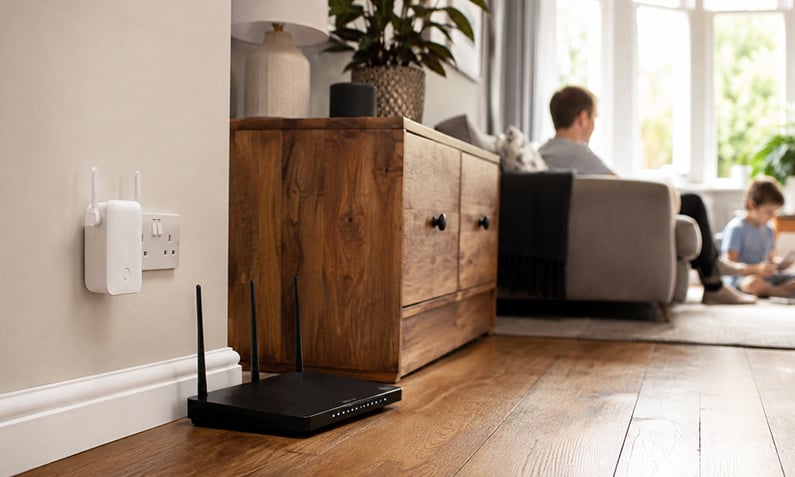
A WiFi booster works by receiving the wireless signal from your router and retransmitting it to extend coverage into parts of your home the router cannot reach well. Manufacturers also sell the same type of device as a WiFi extender or repeater, and there is no clearly defined technical difference between the three terms.

A booster is placed partway between your router and the weak area. It connects to your router’s network, copies the connection and rebroadcasts it, giving you stronger signal in a previously poor spot. Some create a second network name you switch to manually, while others extend the existing network.

A booster does not increase the speed of your broadband line. It redistributes the signal you already have, so it helps with coverage problems, not with a slow connection coming into the property.

James Ford Broadband Deals Reviewed by James Ford, TV and Broadband Expert
Superior

  • New customers only
900Mb average* speed
Unlimited Downloads
£0.00 Setup costs
24 Month contract
Pay as you goCalls
£29.99per month

Full Fibre 150

  • New customers only
  • Switch to Fibrus and they'll cover up to £400 of your switching fees
  • No mid-contract price rises
159Mb average* speed
Unlimited Downloads
£0.00 Setup costs
18 Month contract
Pay as you goCalls
£34.99per month

Extra

  • New customers only
500Mb average* speed
Unlimited Downloads
£0.00 Setup costs
24 Month contract
Pay as you goCalls
£27.99per month

WiFi booster vs extender vs repeater vs mesh

WiFi boosters, extenders and repeaters are essentially the same thing: single devices that improve coverage by rebroadcasting your router’s signal. Mesh WiFi is different, using multiple nodes that work together as one seamless network across your whole home.

The practical distinction is how many areas you need to cover and how smoothly you move between them. A single booster suits one weak room. A mesh system suits a larger or multi-storey home where you want one network name and devices that switch between nodes automatically as you move around.

Option Best for Trade-off
WiFi booster / extender One weak room or a single dead spot May create a separate network and reduce speed on the rebroadcast signal
Mesh WiFi Whole home, multiple floors, larger properties Higher upfront cost than a single booster
Powerline adapter Carrying a connection through house wiring to a distant room Performance depends on the quality of your home’s wiring
Wired Ethernet / access point The most reliable fixed connection to a far room Requires running a cable

Figures are indicative and may change.

If you want the steadiest performance and can run a cable, a wired connection or a wired access point beats any wireless booster. Our guide on WiFi extenders and what they can realistically fix explains when extra coverage helps and when you actually need more speed instead.

Compare broadband deals in your area

Do you need a WiFi booster, or is your line the problem?

You need a WiFi booster only when your broadband line is fast enough but the signal does not reach certain rooms. A booster cannot increase the speed arriving at your property, so if every device is slow including those next to the router, the issue is your line or package, not your coverage.

A simple test: stand next to your router and run a speed test, then repeat it in the room with the problem. If the speed near the router is good but drops far away, a booster or mesh system can help. If the speed is poor even beside the router, you need a faster connection, not a booster.

Full fibre availability is now widespread, so many homes can switch to a faster line rather than patching a slow one. Ofcom’s Connected Nations Spring 2026 update (data as of January 2026, published May 2026) reported that full fibre (FTTP) reached 82% of UK homes, up from 78% in July 2025, and that 89% of premises were within reach of a gigabit-capable network.

Despite that, take-up lags well behind availability, with millions of UK households still on a legacy part-fibre or cable line when full fibre is available at their address. If your speed is the real issue, it is worth checking whether a faster package is available before buying any hardware.

Check full fibre availability at your postcode

How much does a WiFi booster cost in the UK?

A standalone WiFi booster in the UK typically costs from around £15 for a basic single-band model up to roughly £100 for a higher-spec dual-band unit, while mesh systems with multiple nodes generally cost considerably more. Prices vary widely and many cheap listings are unbranded imports with exaggerated coverage claims, so treat low-end figures with caution.

As a named-brand reference point, BT’s Whole Home WiFi 6 mesh kit has been sold around £400 for a three-disc set, with additional discs costing extra. Budget single-device extenders from established brands such as TP-Link can be found from around £15, though the exact price changes over time.

The trade-off with a cheap wireless extender is throughput. Because many extenders use WiFi to talk to the router and then rebroadcast it, the rebroadcast signal can be noticeably slower than the main router connection, sometimes by up to half. A better-quality dual-band device or a mesh system reduces that loss.

Type Indicative UK price
Basic single-band extender From around £15
Dual-band extender Around £30 to £100
Mesh WiFi kit (multiple nodes) From around £150 upwards
Provider mesh pods (add-on) Around £4 to £8 a month

Figures are indicative and may change.

Provider WiFi guarantees and pods explained

A provider WiFi guarantee is a paid add-on where your broadband provider promises a minimum wireless speed in every room and supplies mesh pods to help achieve it. Sky, Virgin Media, BT and several others offer these, and they replace the need to buy a separate booster if you stay with that provider.

Sky’s WiFi Max guarantees minimum in-room wireless download speeds, with Sky stating at least 10Mbps in every room on its Superfast and Full Fibre 75 tiers and a higher 25Mbps guarantee on its faster Full Fibre tiers, supplying up to three Max Pods to help meet them. Sky has priced WiFi Max from around £4 a month, and it comes included on its top-tier packages.

Virgin Media’s WiFi Max Guarantee promises at least 30Mbps in every room, with WiFi Pods supplied if you fall short, and a £100 bill credit if the guarantee is not met. Virgin includes WiFi Max free on its Gig1, Gig2 and Volt packages, with other customers able to add it for a monthly fee.

BT supplies WiFi discs through its Complete WiFi guarantee. BT retains ownership of those discs, so if you cancel or downgrade you are expected to return them or face a per-disc charge. Other providers including Hyperoptic, Rebel Internet and TalkTalk offer their own mesh add-ons or guarantees, and Vodafone offers a guarantee that lets you leave early without penalty if promised speeds are not delivered.

One compatibility point worth knowing: pods from one provider generally will not extend another provider’s proprietary network, so a Virgin pod cannot extend a Sky Q network, for example. Connecting boxes by Ethernet is the usual workaround.

Provider WiFi guarantees and pods explained

Better coverage often starts with a better line

Compare full fibre and broadband deals available at your address.

Where should you place a WiFi booster?

A WiFi booster should be placed roughly midway between your router and the dead spot, in a position where it still receives a strong signal from the router. If you put a booster in the dead zone itself, it has only a weak signal to rebroadcast and will perform poorly.

Position the booster in an open spot rather than behind furniture or inside a cupboard, and keep it away from thick walls, large metal objects and microwaves, which interfere with WiFi. Height helps, so a socket partway up a wall or on an upper shelf often works better than skirting-board level.

For multi-storey homes, place a node or booster on each floor near the stairs so coverage carries between levels. If a single booster cannot reach the area you need, that is usually the sign to move to a mesh system or a wired connection.

See broadband packages with WiFi guarantees

When a booster will not fix the problem

A WiFi booster will not help if the connection coming into your home is slow, because boosters only spread an existing signal and cannot add speed. In rural areas or homes on a poor line, the fix is a better broadband package, not extra coverage hardware.

Boosters also struggle in homes with very thick stone or solid walls, where a wireless rebroadcast signal may not pass through cleanly. In those properties, powerline adapters that use your electrical wiring or a wired Ethernet run to an access point usually give steadier results.

If your average household data demand is high, coverage and capacity both matter. Ofcom’s Connected Nations 2025 report (data July 2025, published November 2025) found average monthly data usage had risen to 583GB per connection across all technologies, climbing to 738GB on full-fibre connections, which is one reason a single ageing extender struggles in a busy modern home.

FAQs about what is a WiFi booster and do you need one

What is the difference between a WiFi booster, extender and repeater?

There is no clearly defined technical difference between a WiFi booster, extender and repeater. All three are marketing terms for a single device that receives your router’s wireless signal and rebroadcasts it to extend coverage. Some models create a separate network name you switch to, while others extend the existing network, but the core job is identical.

Will a WiFi booster slow down my internet?

A WiFi booster does not slow your broadband line, but the rebroadcast signal it produces is often slower than the connection from your main router. This happens because many boosters use WiFi to talk to the router and then resend it, which adds overhead and can reduce throughput on that link, sometimes by up to half. A dual-band model or a mesh system reduces this loss.

Should I buy a WiFi booster or a mesh system?

Choose a single WiFi booster for one weak room or a single dead spot, and a mesh system for a whole home or multiple floors. Mesh uses several nodes that act as one seamless network so devices switch between them automatically as you move around. A booster is cheaper but less smooth across larger spaces.

Do I need a WiFi booster in every room?

You do not need a booster in every room. You only need coverage devices where the router’s signal is weak, so most homes need one or two boosters or mesh nodes placed near the problem areas. Adding more than necessary can create interference rather than improving performance.

Where is the best place to put a WiFi booster?

Place a WiFi booster roughly halfway between your router and the dead spot, somewhere it still receives a strong router signal. Avoid cupboards, thick walls, large metal objects and microwaves, and put it at some height rather than at floor level. If it sits inside the dead zone it has too weak a signal to rebroadcast usefully.

Will a WiFi booster help with slow broadband?

No, a WiFi booster cannot fix slow broadband because it only spreads the signal you already have and cannot increase the speed coming into your home. If your speed is poor even next to the router, you need a faster package or a full fibre line, not a booster. Run a speed test beside the router to check which problem you have.

Are provider WiFi pods better than buying my own booster?

Provider WiFi pods, supplied through add-ons such as Sky WiFi Max or Virgin Media WiFi Max, come with a minimum in-room speed guarantee and support, which a shop-bought booster does not. They are paid monthly rather than a one-off purchase, and you usually have to return them if you leave. A standalone booster is cheaper long term but has no speed guarantee.

Can I use a wired solution instead of a WiFi booster?

Yes, a wired connection is usually more reliable than any wireless booster. A wired Ethernet run to an access point gives the steadiest performance, and powerline adapters that carry the connection through your home’s electrical wiring are a useful alternative where running a cable is difficult. Both avoid the speed loss that wireless rebroadcasting can cause.

Will a WiFi extender help with rural internet?

A WiFi extender will not improve rural internet if the connection into your home is already slow, because extenders only spread an existing signal and cannot add speed. In rural areas, checking whether full fibre, a faster fixed line or a 4G/5G option is available at your address will do more than any coverage device. Boosters only help once you have enough speed to share.

Can a WiFi pod from one provider work with another provider’s router?

Provider WiFi pods are generally designed to work only with that provider’s own router and network, so a pod from one supplier usually will not extend another’s proprietary WiFi. For example, pods cannot extend a Sky Q network because it uses its own hidden network. The common workaround is to connect equipment by Ethernet cable instead.

Also Read Related Articles


Information correct as of 27 June 2026. Prices, tariffs, policy details and providers change frequently, so please check the latest details before making a decision. This article is for general information only and does not constitute financial advice.

4000+ reviews